ビジュアル作業向けChrome拡張

あらゆる画像を プロンプトやテキストに。

画像、スクリーンショット、プレゼン資料、ページの一部を見つけたら、Pixel2Promptが明確なプロンプトや読めるテキストに変換します。

右クリック、ファイルのアップロード、URLの貼り付け、範囲キャプチャに対応。ブラウザを離れずにコピー、翻訳、保存できます。

プロンプト + 表示テキスト結果を翻訳履歴を保存自分のAI · 無料モード
creative-board.com/reference
SELECTED AREA
01Prompt ready
02Text found

ビジュアル参考から使える言葉へ

変換の様子を見る。

広告、ビューティー、インテリア、フード、画面キャプチャを詳しいプロンプトや編集可能なテキストに変換します。

reference_01.jpg
DETAILED PROMPT / 1

Close-up side-profile beauty portrait of a woman with sleek dark hair in a low bun, eyes gently closed, and a polished gold hoop earring. Warm neutral studio wall, diagonal window-blind shadows, luminous natural skin texture, elegant skincare campaign art direction, calm expression, soft directional sunlight, premium editorial photography.
reference_02.jpg
DETAILED PROMPT / 2

Premium commercial photograph of a modern off-white running sneaker with a graphite sculpted sole and restrained acid-lime lace detail. Clean warm-gray studio, low stone plinth, precise three-quarter product view, crisp softbox lighting, realistic knit texture, energetic sportswear campaign styling, subtle grounded shadow.

reference_03.jpg
DETAILED PROMPT / 3

Luxury skincare campaign still life featuring an amber serum dropper bottle and translucent cosmetic jar on warm travertine. Soft water reflections, fresh green botanical leaf, golden morning light, realistic glass and liquid texture, clean unbranded packaging, refined beauty advertising composition.

reference_04.jpg
DETAILED PROMPT / 4

Sophisticated contemporary living room in a high-rise apartment, sculptural cream sofa, round travertine coffee table, olive accent chair, warm wood wall panels, floor-to-ceiling city window, late-afternoon sunlight, calm architectural magazine photography, balanced wide composition.

reference_05.jpg
DETAILED PROMPT / 5

Elegant editorial food photograph of freshly plated pasta with roasted tomatoes, basil leaves, parmesan, and glossy sauce. Dark stone restaurant table, warm side light, fine steam, rich natural textures, shallow depth of field, premium modern dining campaign, appetizing three-quarter composition.

How great visuals capture attention
Good design makes the message impossible to miss.
08:42 / 12:18CC
reference_06.png
VISIBLE TEXT FROM SCREENSHOT / 6

Extracted text from a screenshot taken during playback: “How great visuals capture attention” and “Good design makes the message impossible to miss.” The image also contains a playback time of 08:42 / 12:18 and a visible captions indicator.

reference_01.jpg
DETAILED PROMPT / 1

Close-up side-profile beauty portrait of a woman with sleek dark hair in a low bun, eyes gently closed, and a polished gold hoop earring. Warm neutral studio wall, diagonal window-blind shadows, luminous natural skin texture, elegant skincare campaign art direction, calm expression, soft directional sunlight, premium editorial photography.

reference_02.jpg
DETAILED PROMPT / 2

Premium commercial photograph of a modern off-white running sneaker with a graphite sculpted sole and restrained acid-lime lace detail. Clean warm-gray studio, low stone plinth, precise three-quarter product view, crisp softbox lighting, realistic knit texture, energetic sportswear campaign styling, subtle grounded shadow.

reference_03.jpg
DETAILED PROMPT / 3

Luxury skincare campaign still life featuring an amber serum dropper bottle and translucent cosmetic jar on warm travertine. Soft water reflections, fresh green botanical leaf, golden morning light, realistic glass and liquid texture, clean unbranded packaging, refined beauty advertising composition.

reference_04.jpg
DETAILED PROMPT / 4

Sophisticated contemporary living room in a high-rise apartment, sculptural cream sofa, round travertine coffee table, olive accent chair, warm wood wall panels, floor-to-ceiling city window, late-afternoon sunlight, calm architectural magazine photography, balanced wide composition.

reference_05.jpg
DETAILED PROMPT / 5

Elegant editorial food photograph of freshly plated pasta with roasted tomatoes, basil leaves, parmesan, and glossy sauce. Dark stone restaurant table, warm side light, fine steam, rich natural textures, shallow depth of field, premium modern dining campaign, appetizing three-quarter composition.

How great visuals capture attention
Good design makes the message impossible to miss.
08:42 / 12:18CC
reference_06.png
VISIBLE TEXT FROM SCREENSHOT / 6

Extracted text from a screenshot taken during playback: “How great visuals capture attention” and “Good design makes the message impossible to miss.” The image also contains a playback time of 08:42 / 12:18 and a visible captions indicator.

ドラッグ · カードにカーソル

シンプルなワークフロー

選ぶ。キャプチャ。コピー。

役立つものを見つけた瞬間に、Pixel2Promptでプロンプトや編集可能なテキストに変換できます。

01

見えているものを選ぶ

画像を選択、ファイルをアップロード、URLを貼り付け、またはページの範囲をキャプチャします。

02

必要な範囲をキャプチャ

写真、ポスター、UI、スクリーンショット、スライド、画面に表示された文字から必要な部分だけを選びます。

03

プロンプトやテキストを取得

一度のキャプチャで、ビジュアル説明、表示テキスト、または両方を取得します。

04

コピー、翻訳、保存

すぐに使う、翻訳する、または履歴に保存して後で利用できます。

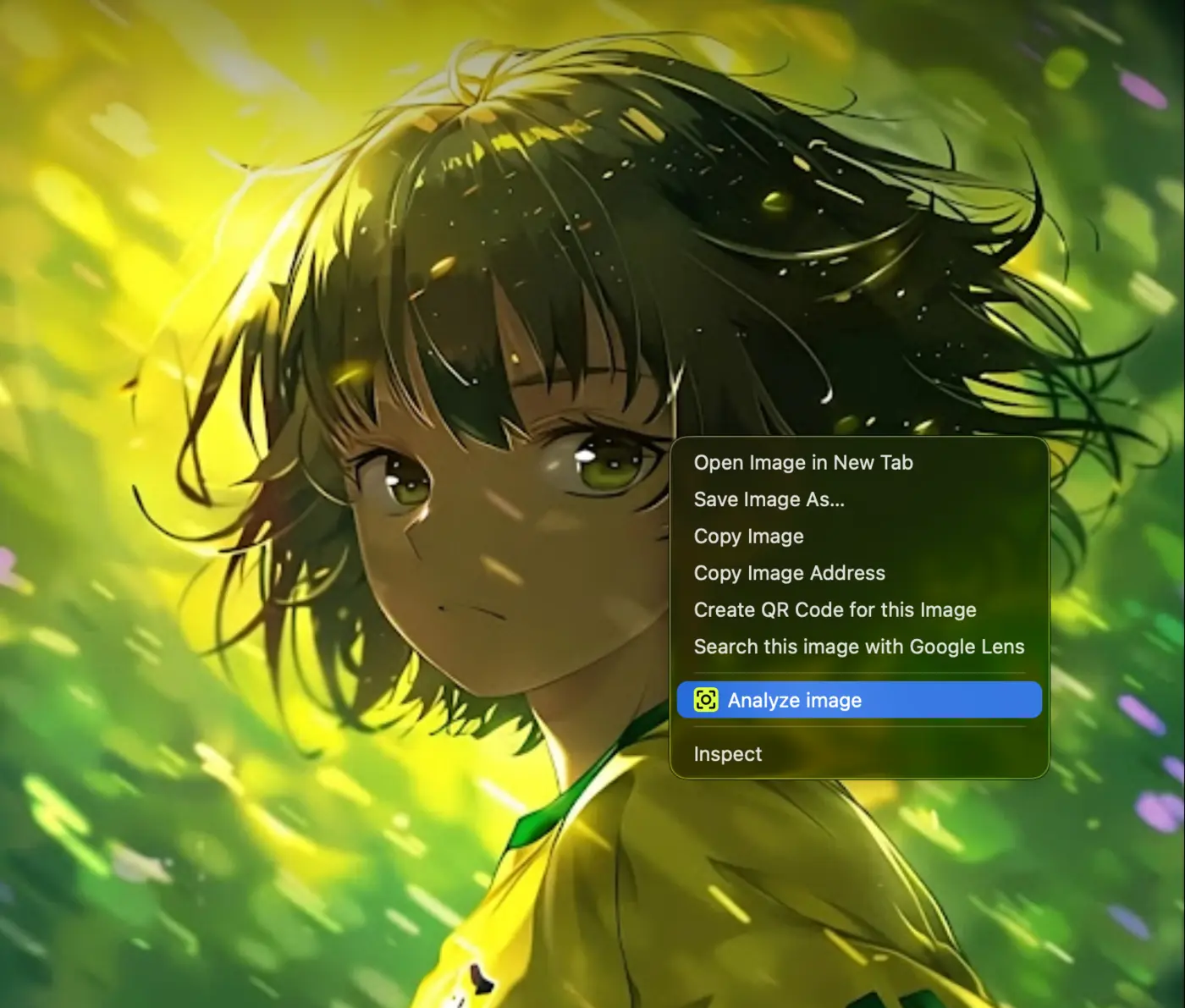
image-reference.jpg
Analyze image command in the browser right-click menu
Analyze imageONE CLICK

最速の使い方

画像を右クリックしてAnalyze imageを選択。

ダウンロードも追加タブも不要です。画像上でブラウザメニューを開くと、Pixel2Promptがサイドバーへ送り解析します。

01

画像を見つける対応するウェブページで

02

右クリックAnalyze imageを選択

03

結果を取得プロンプト、表示テキスト、または両方

1つの拡張でビジュアル作業を完結

Pixel2Promptでできること。

キャプチャから保存まで、すべてのツールがChromeのサイドバーに揃っています。

01

画像からプロンプト

ビジュアル参考を、画像生成に使える明確で詳しいプロンプトに変換します。

02

画像からテキスト

スクリーンショット、ポスター、サムネイル、図表、表紙、スライドから編集可能なテキストを取得します。

03

画面キャプチャからテキスト

再生中の画面やプレゼン資料など、画面に表示された文字をスクリーンショットにして編集可能なテキストへ変換します。

04

ページの任意範囲をキャプチャ

画面全体ではなく、必要な部分だけを囲んで選択できます。

05

プロンプトとテキストを同時取得

同じ画像からクリエイティブなプロンプトと表示されている文字を取得します。

06

結果を翻訳

結果を作り直さず、プロンプトやテキストを別の言語に翻訳します。

07

カスタムプロンプトスタイル

詳細、短文、構造化、カスタムの説明方法を選べます。

08

履歴

以前の画像、プロンプト、テキスト結果にいつでも戻れます。

09

クレジット

ビジュアル解析にクレジットを使い、必要なときに残高を追加できます。

見えるものすべてをキャプチャ

プロンプトかテキストか、選べます。

画像、ページ範囲、または再生画面やスライドから撮ったスクリーンショットを選び、役立つ結果に変換します。

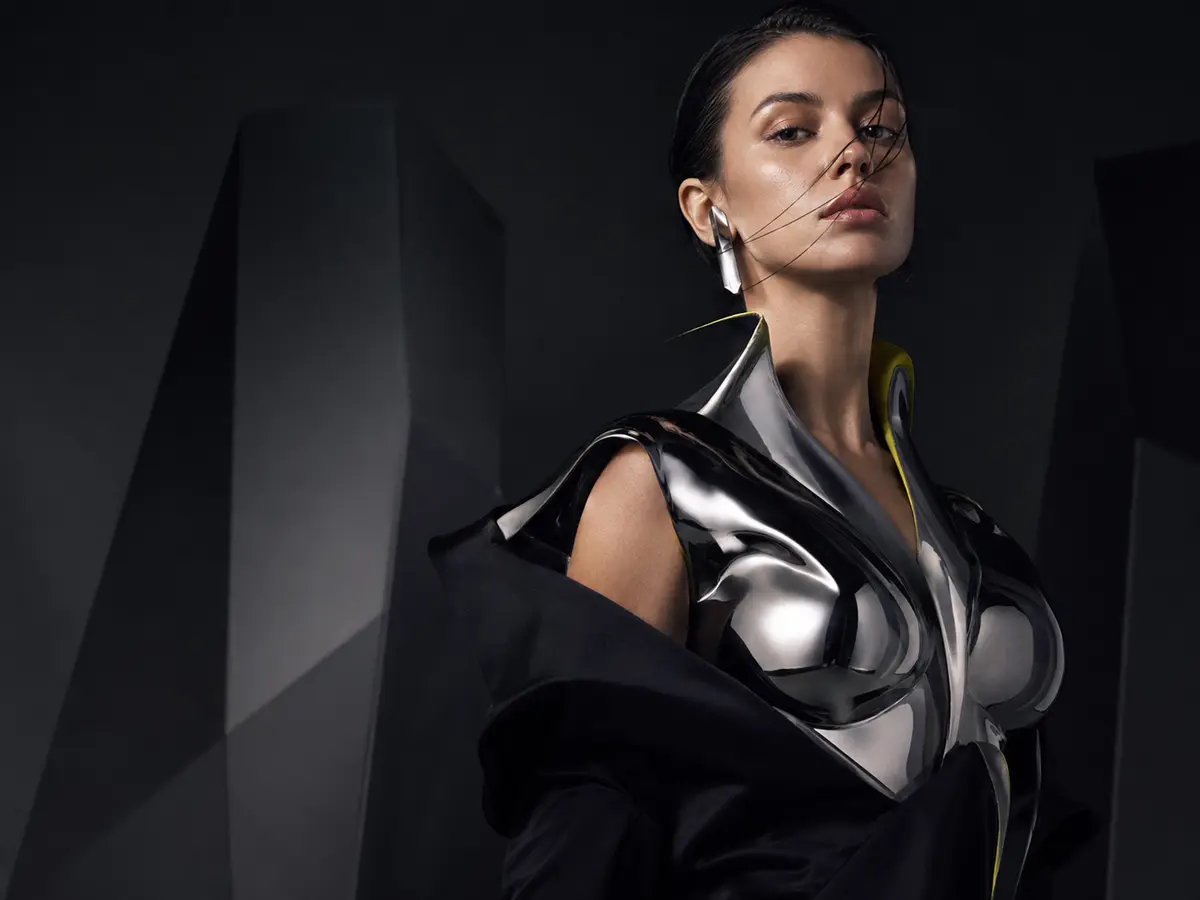
画像1200 × 900
Reference photo selected in the Pixel2Prompt capture demoCAPTURE
PROMPT OUTPUT

Close-up editorial portrait, warm skin tones, dramatic light passing through blinds, polished gold detail, neutral studio background, high contrast photography.

作業に合わせて結果を調整

説明。翻訳。保存。

詳細度を選び、言語を切り替え、後で戻れるビジュアル履歴を残します。

01 / FORMAT

自分の方法で画像を説明

タスクに合う出力形式を選びます。

01詳細

画像の再現に役立つ豊富な詳細。

02短文

素早いアイデアと簡単な方向性。

03構造化

繰り返し使える整理された出力。

04カスタム

独自の指示と結果スタイル。

02 / TRANSLATE

一度作成。必要なときに翻訳。

プロンプトや表示テキストを、読みやすさを保ったまま別の言語へ変換します。

03 / HISTORY

見つけたものを保存。後で再利用。

以前の画像、プロンプト、テキストは見分けやすく、再びコピーできます。

境界のない翻訳

18言語。ひとつのビジュアルワークフロー。

プロンプトと認識テキストをPixel2Prompt内で翻訳。英語、ロシア語、アラビア語、ヒンディー語、タイ語などに対応します。

Pixel2PromptPixel2Prompt翻訳 / 18
ENEnglish
RUРусский
JA日本語
ZH中文
KO한국어
DEDeutsch
FRFrançais
ESEspañol
ITItaliano
PTPortuguês
NLNederlands
PLPolski
TRTürkçe
ARالعربية
HIहिन्दी
IDBahasa Indonesia
VITiếng Việt
THไทย

モデルもキーも自分で選択。

自分のAIを接続してPixel2Promptを無料で利用。

OpenAI、Claude、Gemini、OpenRouter、またはカスタムプロバイダーを選び、APIキーを追加できます。このモードではPixel2Promptクレジットを消費しません。プロバイダー側の料金や制限が適用される場合があります。

MODEL SETTINGSFREE MODE
ProviderChoose your connection
Pixel2PromptCREDITS
OOpenAIOWN KEY
CClaudeOWN KEY
GGeminiOWN KEY
OROpenRouterOWN KEY
+CustomOWN KEY

Your key stays in your browser settings. Provider charges, if any, are billed by that provider.

クレジット

流れを止めずに作り続ける。

クレジットは内蔵Pixel2Promptプロバイダー使用時のみ消費されます。対応する自分のAIを接続すれば、Pixel2Promptクレジットを使わずに利用できます。

クレジットをチャージ
クレジット残高
24 クレジット
次のキャプチャに利用可能38%
クレジットをチャージ

誰のため?

ビジュアル参考が重要なあらゆる仕事に。

01

AI画像クリエイター

参考画像を次の生成に使えるプロンプトへ。

02

デザイナー

レイアウト、色、光、文字、ビジュアルスタイルを研究。

03

コンテンツクリエイター

表紙、ポスター、サムネイル、スクリーンショットから文字とアイデアを収集。

04

編集者・学習者

再生画面やスライドに表示された文字のスクリーンショットを編集可能なメモへ。

05

リサーチャー

スクリーンショットや視覚資料をコピー可能なメモに変換。

06

プロダクトチーム

UI、ランディングページ、製品参考から役立つパターンを保存。

質問と回答

知っておきたいことすべて。

キャプチャ、プロンプト、表示テキスト、翻訳、履歴、クレジットについてわかりやすく回答します。

01Pixel2Promptとは?

画像、スクリーンショット、ページ範囲をプロンプトや読めるテキストに変換するChrome拡張です。

02プロンプトだけを作りますか?

いいえ。ビジュアルプロンプト、画像内の表示テキスト、または両方を取得できます。

03使い方は?

画像を右クリック、ファイルをアップロード、URLを貼り付け、またはページ範囲をキャプチャします。結果はサイドバーに表示されます。

04再生画面やスライドに表示された文字を取得できますか?

はい。文字が見えている間にスクリーンショットを撮り、その画像をPixel2Promptで解析します。動画自体は直接処理しません。

05通常選択できない文字も取得できますか?

画面に見えている文字なら、その範囲をキャプチャして編集可能なテキストにできます。

06結果を翻訳できますか?

はい。プロンプトとテキスト結果を別の言語へ翻訳できます。

07プロンプトの書き方を選べますか?

はい。詳細、短文、構造化、カスタム形式から選べます。

08クレジットは必要ですか?

内蔵プロバイダー利用時のみ必要です。対応AIを自分のAPIキーで接続すればPixel2Promptクレジットは消費されません。プロバイダー側の料金が発生する場合があります。

いつでも始められます

見たものをプロンプトやテキストに。

Pixel2Prompt for Chromeをインストールし、プロンプト、テキスト、翻訳、ビジュアル参考をすぐ使える状態に。